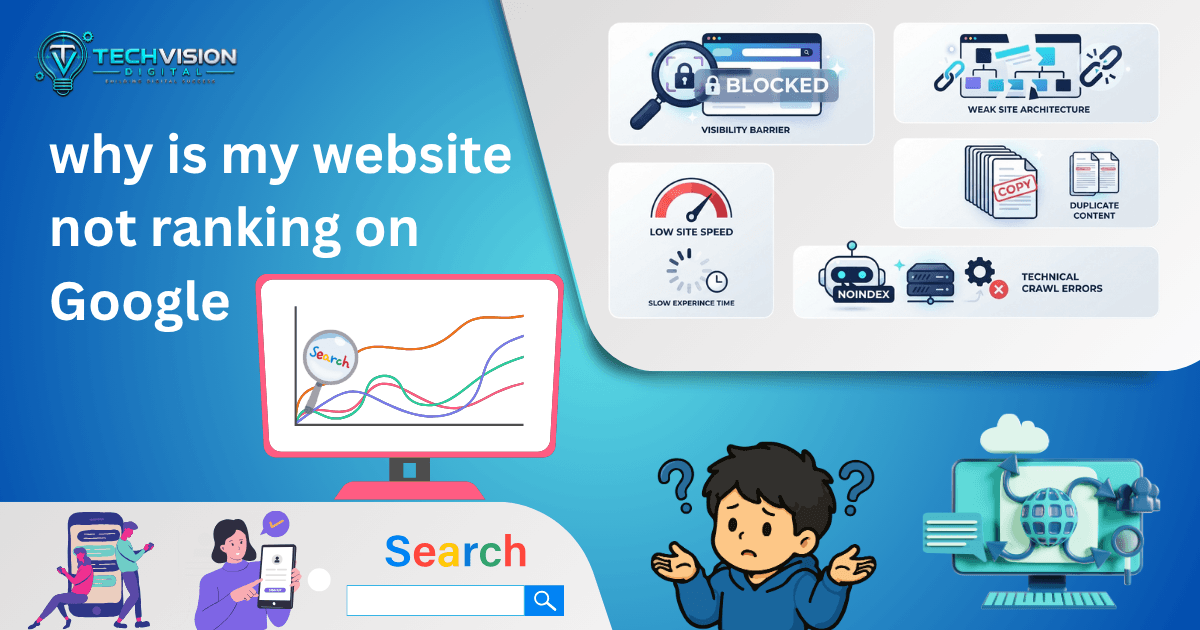

If you’re asking, why is my website not ranking on Google, the first thing to understand is that “not ranking” can mean several different things. Your pages might not be indexed at all. Google might have indexed them but consider them less relevant than competing pages. Or your site could have technical, content, authority, or search-intent problems that prevent it from performing well.
That distinction matters because the wrong diagnosis often leads to wasted effort. Changing keywords won’t fix a noindex directive. Publishing ten more blog posts won’t necessarily solve a page that targets the wrong search intent. And buying backlinks won’t fix a website Google can’t properly crawl.
The practical approach is to work through the problem in layers: access → indexing → relevance → content quality → technical quality → authority → competition.
1. First, Check Whether Google Has Indexed Your Website
Before asking why your website isn’t ranking, determine whether Google has actually included the relevant page in its index.
Indexing and ranking are not the same thing.
A page can be accessible to Google and still fail to rank prominently. Google’s documentation explains that a page needs to meet basic technical requirements to be eligible for indexing, including being accessible to Googlebot, returning a successful HTTP status, and containing indexable content. Even then, indexing is not guaranteed.
For a quick check, search Google for:
site:yourdomain.com
Replace yourdomain.com with your actual domain.
This isn’t a complete diagnostic, but it can give you an initial indication of whether Google has indexed pages from your site.
For a more reliable investigation, use Google Search Console and inspect the specific URL.
Look for Basic Indexing Problems
Common issues include:
- A page accidentally marked noindex
- Googlebot being blocked
- Incorrect robots.txt directives
- A page returning an error instead of a successful response
- Incorrect canonicalization
- Pages that are difficult for Google to discover
- Very new pages that have not yet been crawled or indexed
Google specifically recommends checking whether Googlebot can access the page, whether robots.txt is unintentionally blocking crawling, and whether noindex rules are preventing indexing.
A sitemap can help Google discover URLs, but it should not be treated as a ranking shortcut. Google notes that submitting a sitemap does not guarantee that URLs will be indexed or improve their ranking.
2. Your Page May Be Indexed but Targeting the Wrong Search Intent
Suppose your page is indexed, but it still receives almost no organic visibility.
Now the question changes.
Instead of asking, “Can Google find this page?” ask:
“Is this actually the kind of page Google users are looking for?”
Search intent is the underlying reason behind a query.
Someone searching for:
“best website builder for small business”
probably expects comparisons, recommendations, features, pricing considerations, or buying guidance.
Someone searching for:
“how to fix WordPress 404 errors”
is looking for a troubleshooting process.
Someone searching for:
“WordPress development agency”
may have commercial intent and may be evaluating providers.
If your page doesn’t satisfy the intent behind the query, adding the keyword more times is unlikely to solve the fundamental problem.
Google’s current guidance says its ranking systems are designed to prioritize helpful, reliable information created to benefit people, and recommends creating content for an existing or intended audience rather than producing pages primarily to attract search-engine traffic.
Compare Your Page With the Actual Search Results
Search your target query and examine the pages Google currently considers relevant.
Don’t copy them.
Instead, look for patterns:
- What type of page is ranking?
- Are the results mostly guides, service pages, product pages, or comparisons?
- How specific are the answers?
- What questions do the top pages address?
- What information does the searcher probably expect immediately?
- Is your page solving the same problem?
This can reveal an intent mismatch that ordinary keyword research won’t show.
3. Your Content May Not Provide Enough Original Value
A page can be technically perfect and still struggle because the content doesn’t give readers a compelling reason to choose it.
Google’s current people-first guidance asks whether content provides original information, substantial value, useful analysis, and a satisfying experience rather than simply copying or lightly rewriting what other websites already say.
That doesn’t mean every article needs to be dramatically longer than competing pages.
In fact, Google explicitly says there is no preferred word count that guarantees better rankings.
Instead, ask whether your page does something useful that a generic article doesn’t.
For example, an article about website rankings becomes more useful when it helps the reader distinguish:
“My page isn’t indexed.”
from:
“My page is indexed, but it doesn’t rank for the searches that matter.”
Those are different problems requiring different solutions.
A useful article should help the reader make that distinction quickly.
4. Your Website May Be Too Broad or Lacking a Clear Topic Focus
Another reason a website may struggle is that its content doesn’t establish a clear topical purpose.
Imagine a small web development company publishing articles about:
- Web development
- WordPress
- SEO
- Plumbing
- Celebrity news
- Cryptocurrency
- Travel
- Fitness
- Random technology news
Even if some individual articles are well written, the overall publishing strategy becomes difficult to justify from the perspective of the intended audience.
Google’s people-first guidance asks whether a site has an existing or intended audience and a primary purpose or focus.
For a digital agency, a stronger approach is usually to build depth around topics connected to its genuine expertise.
That might include:
- WordPress development
- Website performance
- Technical SEO
- On-page SEO
- WooCommerce
- UI/UX
- Website maintenance
- Conversion-focused web development
This doesn’t mean every page will rank simply because the subjects are related. It means the content strategy has a coherent reason to exist.
5. Your Page May Be Competing for a Keyword That’s Too Difficult
Sometimes the problem isn’t that your page is bad.
The problem is that you’re asking it to compete for a search where stronger, more established pages already dominate.
A new or relatively small website may struggle to rank immediately for broad queries such as:
“SEO”
or:
“web development”
because those searches can have enormous competition and broad intent.
A more focused query may better match what the business actually offers.
For example, instead of trying to build an entire SEO strategy around a generic term, a website might create useful content around specific problems such as:
- technical SEO for WordPress
- how to fix indexing problems
- WordPress Core Web Vitals troubleshooting
- why a service page isn’t ranking
- how to improve internal linking
The goal isn’t to find an artificially easy keyword.
The goal is to align topic + audience + intent + business expertise.
That creates a more realistic foundation for long-term organic visibility.
The first five checks help establish whether the problem is related to indexing, intent, content quality, topical focus, or competition. If those areas look reasonable, move deeper into the technical and on-page factors that can limit organic visibility.
6. Your Website May Have Technical SEO Problems
Technical SEO problems can make it harder for search engines to crawl, understand, or properly process your pages.
That doesn’t mean every technical issue will cause a ranking collapse. Some technical recommendations are optimization opportunities rather than emergencies. The key is identifying problems that actually affect Google’s ability to access and understand important pages.
Start with the basics.
Check Your Robots.txt File
Your robots.txt file provides crawling instructions to search-engine bots.
An accidental rule can prevent Googlebot from crawling important areas of your site.
For example, a poorly configured robots.txt file could block a directory containing pages you actually want Google to discover.
However, robots.txt and noindex are not interchangeable. Blocking crawling does not provide the same instruction as telling Google not to index a page.
If you’re troubleshooting a ranking problem, don’t change these directives blindly. First determine what the current configuration is doing.
Check for Noindex Directives
A noindex directive tells search engines not to include a page in their search results.
This can be useful for pages that shouldn’t appear in search, but it becomes a serious problem when accidentally applied to:
- Important service pages
- Blog posts
- Product pages
- Category pages that are intentionally part of your search strategy
- Landing pages
- Other pages you actually want indexed
Inspect the affected URL through Google Search Console and your site’s SEO settings before making changes.
Check Canonical URLs
Canonicalization tells search engines which URL should be treated as the preferred version when multiple URLs contain substantially similar content.
Problems can occur when a page accidentally points its canonical URL to a different page.
For example, imagine you publish:
example.com/technical-seo-guide/
but its canonical points to:
example.com/seo-services/
If that wasn’t intentional, you’re sending an inconsistent signal about which URL should represent the content.
Canonical tags aren’t a magic ranking switch, but incorrect canonicalization can interfere with how search engines interpret duplicate or similar URLs.
7. Your On-Page SEO May Be Too Weak or Unclear
On-page SEO is more than placing a keyword in the title.
Google needs to understand what a page is about, while the visitor needs to understand immediately that the page is relevant to their problem.
Review the page’s:
- Title
- Main heading
- Introduction
- Subheadings
- Body content
- Internal links
- Images and supporting text
- Structured data where appropriate
- Page-specific metadata
The important question isn’t:
“Did I use my keyword enough?”
It’s:
“Is the topic unmistakably clear, and does the page thoroughly address the searcher’s need?”
For example, if your target query is “WordPress speed optimization,” a page that repeatedly mentions the phrase but provides only generic advice may be less useful than a page that clearly explains caching, image optimization, scripts, hosting, database issues, and practical troubleshooting.
Keyword relevance matters, but relevance is not the same as repetition.
8. Your Internal Linking May Be Too Weak for website ranking on Google
Internal links connect related pages on your own website.
They can help users discover additional information and help search engines understand relationships between pages.
Consider a website with several useful articles about WordPress performance:
- Why Is My Website Slow?
- How to Optimize WordPress Images
- Core Web Vitals Guide
- WordPress Caching Guide
- Website Speed Optimization
If these pages exist but rarely link to one another, you’re missing an opportunity to create a clearer topical structure.
Internal linking should be logical rather than mechanical.
A link should answer a question such as:
“Would the reader benefit from learning more about this?”
If the answer is yes, the link is probably worth considering.
Use Descriptive Anchor Text to website ranking on Google
Instead of repeatedly using vague anchors such as:
“click here”
use descriptive text that tells the reader what they’ll find.
For example:
“WordPress speed optimization guide”
is more useful than:
“read more.”
Don’t turn every internal link into an exact-match keyword. Anchor text should describe the destination naturally.
9. Your Website May Be Slow or Difficult to Use
Performance is another area worth investigating, particularly when a website contains large images, excessive scripts, heavy plugins, third-party integrations, or inefficient code.
Google’s page-experience guidance considers several signals, including Core Web Vitals, alongside broader factors involved in creating a good page experience.
The practical lesson is not:
“Get a perfect PageSpeed score and you’ll rank.”
That would be an oversimplification.
Instead, look for genuine performance problems that affect visitors.
For example:
- Does the main content take too long to appear?
- Does the layout shift while the page loads?
- Are images unnecessarily large?
- Are unused scripts loading across the site?
- Is a plugin adding functionality you don’t actually need?
- Is the hosting environment struggling under normal traffic?
- Are third-party scripts creating unnecessary delays?
A performance audit should identify causes rather than simply recommend installing another optimization plugin.
10. Your Content May Not Match the Quality Expected for the Query
There is an important difference between having content and having useful content.
Publishing dozens of short articles doesn’t automatically create authority.
If every article says roughly the same things as hundreds of existing pages, readers have little reason to prefer your version.
Look at your content critically.
Ask:
- Does this page answer the question directly?
- Does it explain why, not just what?
- Does it include useful examples?
- Does it address obvious follow-up questions?
- Does it acknowledge limitations?
- Does it help the reader make a decision?
- Is anything important missing?
- Is any section present only because you wanted to include another keyword?
Google’s people-first guidance encourages publishers to evaluate whether content provides substantial value and a satisfying experience rather than being created primarily to attract search traffic.
Don’t Confuse Length With Quality
A 2,500-word article isn’t automatically better than a 900-word article.
If a reader can get a complete, accurate answer in 900 words, adding another 1,600 words of repetition makes the page worse, not better.
Long-form content works when the subject genuinely requires depth.
The objective is complete usefulness, not maximum word count.
11. Your Website May Lack Relevant Authority
Google uses many signals to determine which pages are useful and relevant for particular searches.
For competitive topics, your website may be competing against sites with years of accumulated reputation, strong content libraries, relevant links, recognizable brands, and extensive coverage of the subject.
This doesn’t mean a smaller website cannot compete.
It means authority should be built through legitimate value.
For a web development business, that could mean publishing genuinely useful material around areas you actually understand:
- WordPress development
- Technical SEO
- Website performance
- WooCommerce
- Website maintenance
- UI/UX
- Conversion-focused websites
You can then connect related articles through useful internal links and earn external references naturally when people find the material worth citing.
Don’t Buy Random Backlinks to website ranking on Google
When a page isn’t ranking, purchasing a package of low-quality backlinks can seem like an easy solution.
It’s usually a poor diagnostic strategy.
If your page has the wrong search intent, weak content, technical problems, or poor internal structure, more links won’t necessarily solve the underlying issue.
Fix the foundation first.
Authority should support useful content—not compensate for its absence.
12. Your Competitors May Simply Be Doing a Better Job
Sometimes the uncomfortable answer to why is my website not ranking on Google is that another page currently provides a better result for the searcher.
That doesn’t necessarily mean your website is bad.
It means you need to understand the competitive environment.
Review the pages ranking for your target query and compare them against yours.
Look at:
- Depth of coverage
- Accuracy
- Original information
- Clarity
- Page structure
- Search-intent alignment
- Internal linking
- Supporting resources
- Author and site context
- User experience
- Freshness where freshness matters
Don’t copy the competitor.
Instead, identify what the search results collectively tell you about the user’s expectations.
Then ask:
What can my page do better, clearer, or more usefully?
That question leads to a much stronger SEO strategy than simply trying to add more keywords.
A Better Way to Diagnose the Problem to website ranking on Google
Rather than changing ten things at once, work through the problem systematically.
Step 1: Confirm Indexing
Use Google Search Console to determine whether the important URL is indexed and whether Google reports an indexing issue.
Step 2: Confirm Search Intent
Search the target query and determine what type of content Google currently considers relevant.
Step 3: Evaluate the Page
Check whether your content provides a complete, accurate, useful answer.
Step 4: Check Technical SEO
Review crawling, indexing directives, canonicalization, sitemap discovery, redirects, errors, and other technical issues.
Step 5: Review On-Page Signals
Make sure the title, H1, headings, content, links, and supporting elements clearly communicate the page’s subject.
Step 6: Review Internal Links
Connect the page to relevant supporting and authoritative pages within your own website.
Step 7: Review Performance
Investigate genuine speed and usability problems rather than chasing a perfect automated score.
Step 8: Compare the Competition
Determine whether competing pages satisfy the search intent more effectively.
This sequence helps prevent one of the most common SEO mistakes: changing everything before identifying the actual problem.
If you change your title, rewrite the content, install three plugins, build backlinks, and redesign the page simultaneously, you may improve something—but you won’t know what actually made the difference.
A diagnostic approach gives you a much clearer path forward.
Once you’ve worked through the obvious technical and content issues, the next step is to use actual search data rather than relying on assumptions.
Use Google Search Console to Find the Real Problem
If you’re wondering why is my website not ranking on Google, Google Search Console should be one of the first places you investigate.
The Performance report provides data such as:
- Impressions
- Clicks
- Click-through rate
- Average position
- Search queries
- Pages
- Countries
- Devices
- Search appearance
This is much more useful than repeatedly searching your own keyword and assuming the result you see represents everyone’s search experience. Google notes that search results can vary based on factors such as location and search history.
Look at Impressions Before Obsessing Over Position
Suppose a page has:
- 2,000 impressions
- 40 clicks
- An average position around 20
That tells you something different from a page with:
- 0 impressions
- 0 clicks
- No meaningful search visibility
The first page is appearing for searches but may need stronger relevance, content, title optimization, or competitive positioning.
The second may require a more fundamental investigation.
Google recommends focusing on trends in impressions and clicks rather than treating average position as the only measure of performance.
Find the Queries Your Page Already Appears For
Open the Performance report and examine the queries associated with the page.
You may discover that Google is already showing your page for related searches you didn’t intentionally target.
That’s valuable information.
For example, you might publish an article targeting:
website not ranking on Google
but discover that the page receives impressions for searches involving:
- website not showing in Google
- website indexed but not ranking
- Google ranking problems
- website SEO issues
- why website isn’t appearing in search
These queries can reveal how Google and users are interpreting the page.
Don’t automatically rewrite the article around every variation. Look for meaningful patterns.
Don’t Panic if Your Page Isn’t Ranking Immediately
SEO does not work like publishing a page today and receiving a guaranteed position tomorrow.
A new page may need time to be discovered, crawled, indexed, evaluated, and shown for relevant searches. Even after indexing, its visibility can change as Google’s systems evaluate the page against other available results.
This is one reason you should avoid making major changes every few days.
If you continually change the title, URL, content, internal links, and target keyword before collecting enough information, you make the site harder to diagnose.
Instead, establish a baseline.
Record:
- Current impressions
- Clicks
- CTR
- Queries
- Average position
- Indexed status
- Important technical issues
Then make purposeful improvements and monitor the trend.
Search Console is designed specifically to help site owners understand how their pages perform in Google Search, including which queries generate impressions and clicks.
Check for Keyword Cannibalization
Another possible reason a page isn’t performing as expected is that multiple pages on your website are targeting essentially the same search intent.
For example, imagine a site has three articles:
- Why Is My Website Not Ranking?
- Why Is My Website Not Showing on Google?
- Why Does My Website Rank So Low?
If all three provide nearly the same answer and target nearly the same audience, you’ve created overlapping content rather than a clear content ecosystem.
The solution isn’t necessarily to delete pages immediately.
First determine whether the pages have genuinely different purposes.
You may find that one should become the main comprehensive guide while another serves a narrower supporting intent.
In some cases, consolidating overlapping content can create a clearer and stronger resource than maintaining several near-duplicate pages.
Review Your Website’s Backlink Profile Carefully to website ranking on Google
Backlinks can contribute to a site’s authority and discovery, but they shouldn’t be treated as the first answer to every ranking problem.
If your website has:
- Strong technical foundations
- Excellent content
- Correct search intent
- Good internal linking
- A clear topical focus
and is still competing against highly established websites, authority may become an increasingly important part of the challenge.
But don’t reduce SEO to a backlink-count competition.
Ten relevant, legitimate references can be more meaningful to your strategy than hundreds of unrelated links acquired simply to increase a number.
Focus on creating resources people have a reason to reference.
Examples might include:
- Original research
- Useful tools
- Detailed technical guides
- Original illustrations
- Well-developed tutorials
- Expert analysis
- Data-driven resources
The objective is to earn attention and references because the content is genuinely useful.
Check Your Title and Search Snippet
If your page is receiving impressions but very few clicks, the problem may not be ranking alone.
Your search result also needs to communicate relevance.
Consider a page that appears for 1,000 searches but receives almost no clicks.
Potential explanations include:
- The title doesn’t clearly match the search
- The description is vague
- The result looks less useful than competing pages
- The search intent isn’t being communicated
- The query itself isn’t a strong match for your page
Search Console’s Performance report lets you examine impressions, clicks, and CTR together rather than looking at ranking position in isolation.
Don’t turn this into clickbait.
A title should accurately describe what the page delivers.
Don’t Change the URL Without a Good Reason to website ranking on Google
When a page isn’t ranking, some site owners immediately change its URL.
That can create additional complications.
If the existing URL is already known by search engines, linked from other pages, or receiving traffic, changing it requires careful handling of redirects and canonical signals.
A cleaner URL can be worthwhile when the current one is genuinely problematic, but changing URLs should not become a routine SEO experiment.
Fix the actual problem first whenever possible.
What Should You Fix First?
If you’ve identified several problems, prioritize them.
A practical order is:
Priority 1: Indexing and Accessibility
Make sure Google can access the important page and that you’re not unintentionally blocking indexing.
Priority 2: Search Intent
Confirm that the page actually answers the searcher’s intended question.
Priority 3: Content Quality
Improve missing information, weak explanations, outdated material, and generic sections.
Priority 4: Technical SEO
Resolve meaningful issues involving crawling, canonicalization, redirects, errors, mobile usability, and other technical barriers.
Priority 5: Internal Linking
Connect related pages naturally and make your site’s information architecture clearer.
Priority 6: Performance and User Experience
Address genuine performance problems that make the page difficult to use.
Priority 7: Authority and Competition
Once the foundation is sound, evaluate whether the competitive environment requires stronger topical depth, reputation, or legitimately earned references.
This order isn’t a universal ranking formula. It’s a troubleshooting framework designed to stop you from spending resources on advanced tactics before fixing fundamental problems.
A Simple Website Ranking Troubleshooting Checklist to website ranking on Google
Before deciding that your website “isn’t ranking,” run through this checklist:
- Is the important page indexed?
- Can Googlebot access it?
- Is an accidental noindex directive present?
- Is robots.txt blocking something important?
- Is the canonical URL correct?
- Does the page satisfy the search intent?
- Does the content provide meaningful value?
- Is the topic clearly defined?
- Are the title and H1 accurate?
- Does the page have useful internal links?
- Are there overlapping pages targeting the same intent?
- Does the page have genuine technical problems?
- Are performance issues affecting users?
- What queries is Search Console showing?
- Are impressions increasing or declining?
- Is the page earning impressions but weak clicks?
- How does the content compare with the current search results?
- Is the competition substantially stronger?
- Does the page need updating rather than replacing?
- Are you changing too many variables at once?
This checklist gives you a much more useful starting point than simply asking whether your keyword appears enough times.
FAQs
Why is my website not ranking on Google even though it is indexed?
Indexing only means Google has included the page in its index. It does not mean the page will rank prominently for your target query.
The page may have a search-intent mismatch, weak content, technical issues, limited authority, strong competition, or another relevance problem.
How do I know if Google has indexed my website?
Google Search Console provides much more useful diagnostic information than relying solely on a site: search. URL Inspection can help you investigate individual URLs and identify reported indexing issues.
Does having a sitemap make my website rank?
No. A sitemap helps search engines discover URLs, but submitting one does not guarantee that pages will be indexed or ranked.
How long does it take for a website to rank on Google?
There is no universal ranking timeline.
Results depend on factors such as the site’s history, competition, content quality, technical condition, authority, query intent, and Google’s evaluation of the pages.
Avoid anyone promising a fixed ranking date or guaranteed position.
Should I add more keywords if my page isn’t ranking?
Not automatically.
First determine whether the page satisfies the search intent and provides useful information. Adding the same keyword repeatedly can make the writing worse without solving the underlying problem.
Should I buy backlinks if my website isn’t ranking?
Don’t treat paid backlink packages as a default solution.
First fix indexing, technical SEO, content quality, search intent, internal linking, and other foundational issues. If authority is genuinely a competitive limitation, focus on earning relevant references through valuable content and legitimate promotion.
Can website speed affect Google rankings?
Performance and page experience are worth addressing, particularly when they create real usability problems. But speed should not be treated as the sole explanation for poor rankings.
A technically fast page with weak content and poor search-intent alignment can still perform poorly.
Why did my rankings suddenly drop?
A sudden decline can have many possible causes, including changes in search demand, technical problems, content changes, competitive changes, indexing issues, or changes in Google’s systems.
Use Search Console to compare periods and identify which pages and queries changed rather than assuming a single cause. Search Console supports comparisons of performance trends across dates, queries, pages, devices, and other dimensions. (Google Support)
Conclusion
If you’re asking why is my website not ranking on Google, don’t assume the answer is simply “you need more keywords” or “you need more backlinks.” Ranking problems can originate at very different levels, from basic indexing and crawling issues to search intent, content quality, technical SEO, internal linking, performance, authority, and competition.
Start with the fundamentals. Confirm that Google can access and index the important pages. Then use Search Console to understand what your site is actually appearing for, whether impressions are growing, and where your pages are losing opportunities. From there, improve the areas that genuinely need attention rather than changing everything at once.
The most useful next step is a structured SEO audit that identifies the actual bottleneck before recommending a solution.
If your website is indexed but still struggling to gain meaningful visibility, TechVision Digital can help evaluate its technical SEO, on-page structure, content relevance, and website performance so you can work from a clearer optimization plan.